
Exam objective (Domain 1, 40–45%): Identify AI model components and configurations — identify appropriate model deployment options and configuration parameters. Related: choosing a model (u04), deploying and using the playground (u12), the chat client in code (u13), client data governance (u21), quotas and cost (u23).
1. The pain: the pilot goes live on a Monday
Priya's Service Desk assistant runs on a gpt-5-mini deployment she created with default settings. Then the pilot widens:
- Monday 09:00, the timesheet deadline. 600 staff ask questions at once. Half get HTTP 429 — rate limit exceeded.
- Risk & Legal read the deployment details: type: Global Standard. "So a German client's name in a prompt can be processed in a US datacenter?"
- Finance wants 40,000 archived invoices summarised by month-end. Nobody needs the answers within seconds — but the pilot deployment would bill them at full price and compete with live users for quota.
- Users: answers are sometimes rambling, sometimes different each time.
All four are the same topic: how a model is deployed and how each request is configured. The model was the right one. The deployment and the parameters were not.
2. What a deployment is
A deployment makes a catalog model callable at an endpoint under a deployment name. When you deploy, you decide:
- Model and version — pin a version or let it auto-upgrade.
- Deployment type — where requests are processed and how you pay (section 3).
- Rate limit / capacity — tokens per minute (TPM) for pay-per-token types, or provisioned throughput units (PTUs) for provisioned types (section 5).
- Safety settings such as the content filter (u06).
The portal's Deploy button with default settings usually chooses Global Standard. That is a reasonable start — and a decision you should make on purpose for client data.
Serverless API vs managed compute
As of September 2026, Microsoft's deployment overview names two deployment options:
| Option | What it is | Billing | Notes |
|---|---|---|---|
| Serverless API — the preferred option | Microsoft runs the model; you call it. Covers all Foundry Models sold directly by Azure (including Azure OpenAI) and selected partner models | Per token, or reserved PTUs | All the deployment types below; built-in, configurable content filtering; Entra ID or key auth; private networking |
| Managed compute (preview) | Dedicated GPU capacity hosting open-source, partner or custom-weight models | Per hour per accelerator, with autoscale and scale-to-zero | Microsoft notes content filtering is not available in the preview, and it is Global only |
Older material and some portal screens use other names (for example "standard deployment" for the serverless option). For the exam: pay per token, Microsoft-managed vs you pay for GPU hours. Microsoft also offers a preview "instant access" mode that calls some models by name without creating a deployment — useful for trying a model, not a production pattern.
Exam trap — managed compute is not "cheaper by default". GPU hours bill while the deployment is running, whether or not anyone calls it. For spiky or low traffic, per-token serverless is usually cheaper.
3. Deployment types: where data is processed, how you pay
Description
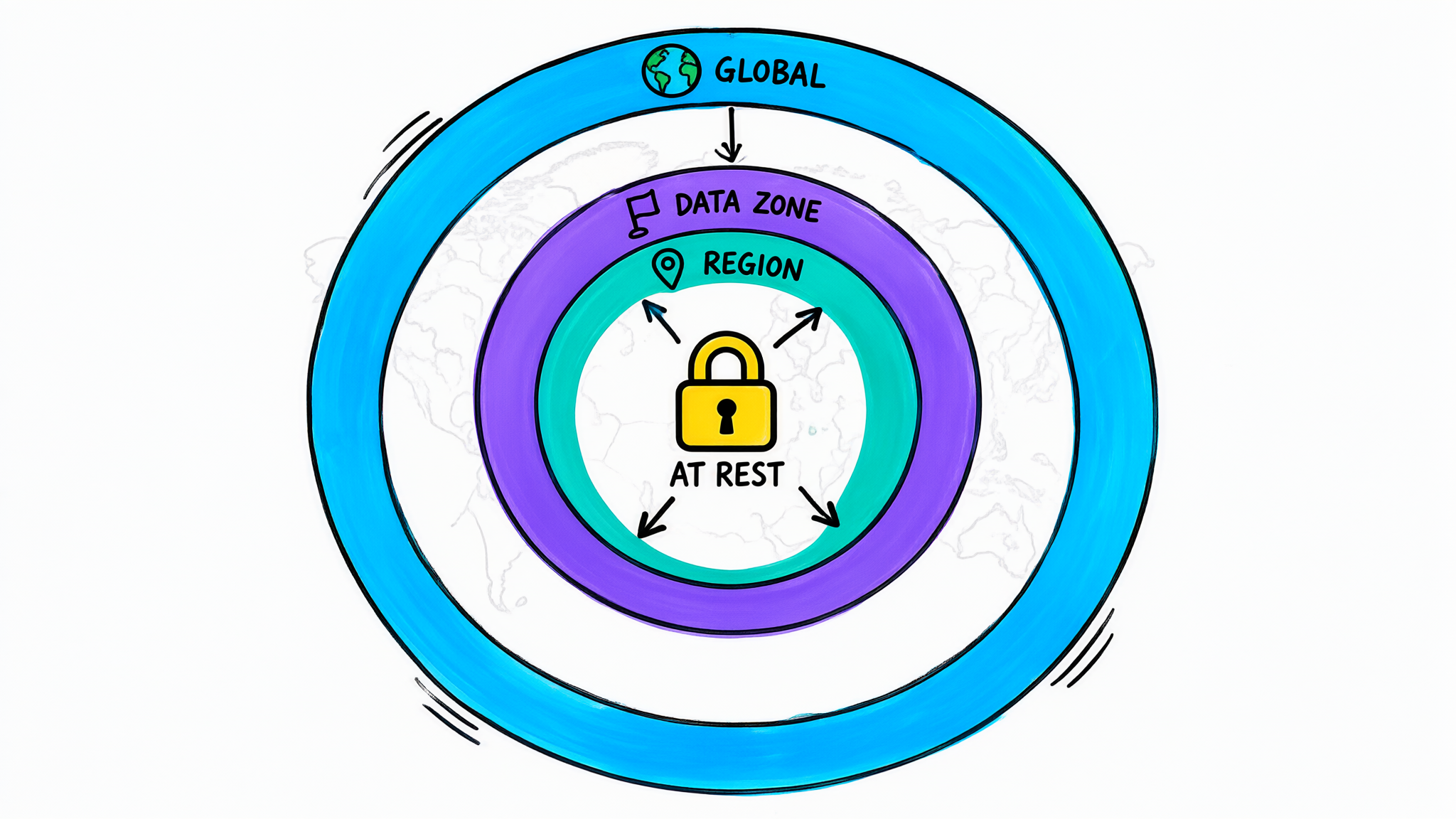
A colourful hand-drawn sketchnote of three concentric rings drawn over a simple doodled world map. The outer ring is azure blue with a small globe icon and is labelled GLOBAL. The middle ring is violet with a small flag-like doodle and is labelled DATA ZONE. The inner ring is teal with a map pin and is labelled REGION. In the very centre sits a sunny-yellow padlock labelled AT REST. The idea: a deployment type decides how far from your chosen region prompts and responses may be processed — anywhere, within a data zone such as the EU or US, or within the geography of your region — while stored data stays in your geography in every case. It does not show prices, quotas or specific Azure regions.
Every deployment type answers two questions: where may prompts and responses be processed, and how do you pay. Microsoft's data-privacy documentation adds the constant: data stored at rest (for example uploaded files) stays in the customer-designated geography whatever the type.
| Deployment type | SKU name | Processing location | Billing | Use it for |
|---|---|---|---|---|
| Global Standard | GlobalStandard |
Any Azure region | Pay per token | Default start: lowest price, highest default quota, new models first |
| Data Zone Standard | DataZoneStandard |
Within a data zone: US, EU (EU Data Boundary) or APAC | Pay per token | Data-residency needs at zone level, with higher quota than regional |
| Standard | Standard |
Within the resource's Azure geography | Pay per token | Strict geography requirements; low-to-medium, bursty volume; fewer models and less throughput |
| Global Provisioned | GlobalProvisionedManaged |
Any Azure region | Reserved PTUs | Predictable high throughput, stable latency |
| Data Zone Provisioned | DataZoneProvisionedManaged |
Within the data zone | Reserved PTUs | Zone residency plus guaranteed throughput |
| Regional Provisioned | ProvisionedManaged |
Within the geography | Reserved PTUs | Geography residency plus guaranteed throughput |
| Global Batch | GlobalBatch |
Any Azure region | About 50% less than Global Standard; target turnaround 24 hours | Large asynchronous jobs |
| Data Zone Batch | DataZoneBatch |
Within the data zone | Batch discount, 24-hour target | Large async jobs with zone residency |
| Developer | DeveloperTier |
Any region | Pay per token | Evaluating fine-tuned models only; deleted after 24 hours; no SLA |
Three families to remember:
- Standard (pay-as-you-go): Global → Data Zone → (regional) Standard, from widest to narrowest processing boundary.
- Provisioned: you reserve capacity in PTUs and pay for it whether you use it or not; in return, throughput and latency are predictable.
- Batch: you submit a file of requests, results arrive within a 24-hour target at about half price; batch has a separate enqueued-token quota, so it does not starve your live traffic.
Not every model supports every type in every region — check the model card and Microsoft's model-by-region tables (u04).
Exam trap — Data Zone vs Standard. "Data must be processed within the EU" → Data Zone Standard in an EU region (or regional Standard, if available and throughput is enough). "Within the resource's own geography only" → Standard or Regional Provisioned. Global types may process anywhere.
Exam trap — batch is not "slow standard". Batch is for jobs that can wait up to a day, at a discount, with its own quota. It is wrong for anything a user waits for.
Description
A top-to-bottom decision flow with three diamond questions. First: can results wait up to 24 hours? Yes leads to Global Batch or Data Zone Batch. No leads to the second question: is there steady high volume that needs guaranteed throughput or latency? Yes leads to Provisioned throughput with PTUs, in Global, Data Zone or Regional form. No leads to the third question: is a processing boundary required? None leads to Global Standard; a data zone such as the EU or US leads to Data Zone Standard; a single geography leads to regional Standard. The provisioned and batch branches also have Data Zone variants, which the diagram mentions but does not branch again. It does not show prices or model availability.
4. Configuration parameters: shaping each request
A deployment fixes where and how much. Parameters in each request shape what comes back. In the Foundry playground they appear as model settings; in code they are arguments to responses.create(...) (Responses API) or chat.completions.create(...) (Chat Completions API). Parameter availability depends on the model and API.
Description
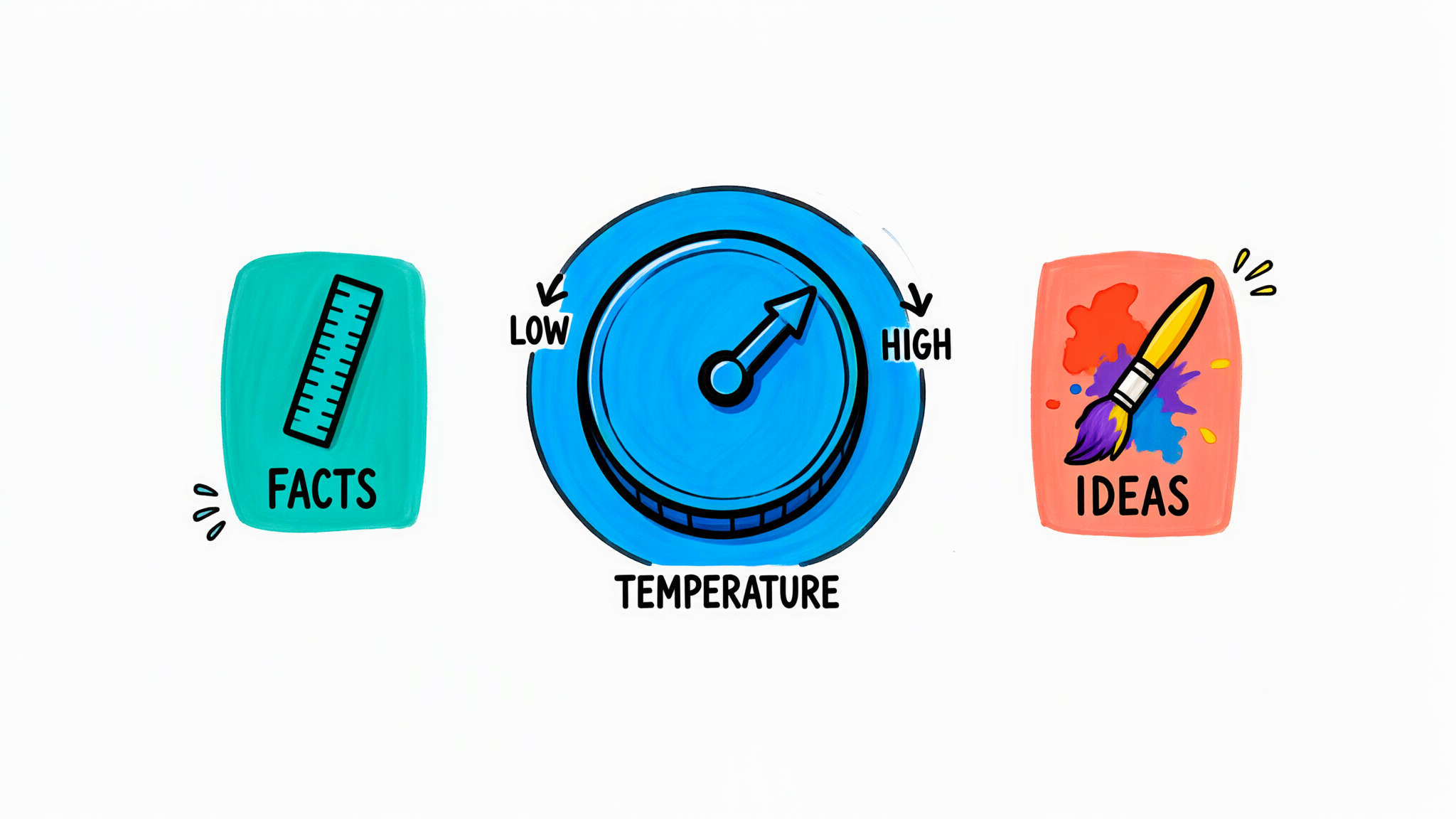
A colourful hand-drawn sketchnote of a large round dial like an oven knob, drawn in azure blue and labelled TEMPERATURE. The left end of its scale is marked LOW, next to a teal tile with a straight ruler labelled FACTS. The right end is marked HIGH, next to a coral tile with a paintbrush and splashes labelled IDEAS. The idea: temperature controls how adventurous the model's token choices are — low for consistent, factual answers, high for varied, creative ones. It does not show that reasoning models may not accept this setting, and it does not suggest low temperature makes answers true.
| Parameter | What it does | Typical use at Aldervane |
|---|---|---|
| Temperature (0–2) | Randomness of token choice. Low = focused, repeatable; high = varied, creative | 0.2 for policy Q&A; 0.8 for newsletter headline ideas |
| Top P (nucleus sampling) | Samples only from the smallest set of tokens whose probabilities add up to P | Alternative to temperature; Microsoft's guidance is to adjust one or the other, not both |
| Max output tokens | Caps the length of the response (in the Responses API max_output_tokens; in Chat Completions max_completion_tokens, which replaces the deprecated max_tokens) |
300 for Service Desk answers — stops rambling, caps cost |
| Frequency penalty (−2 to 2) | Penalises tokens by how often they have already appeared → less verbatim repetition | Long summaries that keep repeating a phrase |
| Presence penalty (−2 to 2) | Penalises tokens that have appeared at all → nudges towards new topics | Brainstorming lists |
| Stop sequences (up to 4) | Generation stops when one of these strings appears | Stop after END_OF_ANSWER or before a new User: line |
| Seed | Best-effort repeatable sampling; not guaranteed and marked deprecated in the current Chat Completions reference | Occasional test reproducibility — don't rely on it |
| Reasoning effort (reasoning models) | How much the model thinks before answering: typically low, medium, high; some models add values such as minimal/none or xhigh |
Low for simple lookups; high for complex fee analysis |
Frequency and presence penalties, stop sequences and seed belong to the Chat Completions API; the Responses API used in the AI-901 labs exposes a smaller set (temperature, top P, max output tokens, reasoning settings).
Reasoning models are different. Microsoft's reasoning-model documentation lists parameters they do not support, including temperature, top_p, presence_penalty, frequency_penalty and max_tokens. You steer them with reasoning effort and cap them with max_output_tokens / max_completion_tokens, which counts reasoning tokens plus visible output. Set the cap too low and the model can spend it all thinking and return little or nothing.
Exam trap — max tokens vs context window. Max output tokens is a per-request cap you choose. The context window is the model's fixed maximum for input + output (u03).
Exam trap — temperature vs reasoning effort. "More creative / more varied" → temperature (non-reasoning models). "Think harder on a complex problem" → reasoning effort (reasoning models).
In code (Responses API, via the Foundry SDK from u01):
# policy Q&A on a chat model: focused and short
response = client.responses.create(
    model=os.environ["MODEL_DEPLOYMENT"],
    instructions="You are the ENGAGE Service Desk assistant. Answer in at most 5 bullets.",
    input="Who approves time on a client engagement?",
    temperature=0.2,
    max_output_tokens=300,
)

# complex analysis on a reasoning model: no temperature, set effort instead
response = client.responses.create(
    model=os.environ["REASONING_DEPLOYMENT"],
    input="Compare fixed-fee vs time-and-materials for this engagement: ...",
    reasoning={"effort": "medium"},
    max_output_tokens=4000,   # includes reasoning tokens
)
5. Quotas: TPM and RPM
- Tokens per minute (TPM) is assigned per subscription, per region, per model, per deployment type. Creating a deployment with 50K TPM takes 50K from that pool; you can split the pool across deployments.
- Requests per minute (RPM) comes with TPM: quota is allocated in capacity units, each carrying a fixed amount of TPM and RPM that varies by model.
- The rate limiter estimates a request's tokens when it arrives — prompt size plus the max output tokens you asked for. An oversized
max_output_tokens"uses up" quota even if the answers are short. Microsoft notes this estimate is not the same as the billed token count. - Over the limit you get 429 responses. Clients should retry with backoff; the fix is more TPM, a smaller
max_output_tokens, fewer concurrent calls, spreading load — or a different deployment type. - Provisioned deployments are sized in PTUs instead of TPM; batch has its own enqueued-token quota.
6. Aldervane's fixes
| Pain | Change |
|---|---|
| 429s at Monday 09:00 | Raise TPM on the deployment; cut max_output_tokens from the default to 300; if the Monday peak is steady and business-critical, evaluate a Data Zone Provisioned deployment |
| EU client data | Redeploy as Data Zone Standard in an EU region; data at rest already stays in the geography |
| 40,000 invoice summaries | Data Zone Batch job overnight: about half price, separate quota, no impact on live users |
| Rambling, inconsistent answers | Temperature 0.2, clear instructions, max_output_tokens 300 — plus grounding (u14) for consistent facts |
7. The cost
- Global is cheapest, narrow boundaries cost choice. Global Standard has the lowest price and highest quota; Data Zone and regional types may cost more, get new models later and offer less throughput.
- Provisioned bills whether you use it or not. PTUs make sense for steady, predictable load; for spiky internal tools, pay-per-token is usually cheaper.
- Batch trades time for money. Half price, but results within a 24-hour target — sometimes later.
- Managed compute bills GPU hours while running; scale-to-zero helps, idle capacity still costs.
- Max output tokens is a cost and quota lever. A high cap wastes quota via the rate-limit estimate and allows long, expensive answers.
- Reasoning effort is a cost dial. Higher effort → more reasoning tokens, billed as output → higher bill and latency.
- Compliance boundary. Choosing Global for client data may breach a contract even if the answers are perfect. For Aldervane, the deployment type is a Risk & Legal decision, not a developer default.
8. Exam traps — summary
- Default/general, cheapest, highest quota → Global Standard.
- Process within EU/US data zone → Data Zone Standard (or Data Zone Provisioned/Batch).
- Process within one geography → Standard / Regional Provisioned.
- Guaranteed throughput, predictable latency → Provisioned (PTUs).
- Large async job, 24-hour target, ~50% cheaper, separate quota → Batch.
- Evaluate a fine-tuned model cheaply, 24-hour lifetime → Developer.
- Data at rest stays in your geography for every type; the type governs processing.
- Consistent/factual → low temperature; creative → higher. Change temperature or top P.
- Response length and cost cap → max output tokens; repetition → frequency penalty; new topics → presence penalty; cut off at a marker → stop sequence.
- Reasoning models: no temperature/top P/penalties; use reasoning effort; the output cap includes reasoning tokens.
- 429 = rate limit (TPM/RPM); large
max_output_tokenscounts against the estimate.
9. Remember the pictures
Redraw the rings — GLOBAL, DATA ZONE, REGION, with AT REST locked in the centre — and the TEMPERATURE dial from LOW/FACTS to HIGH/IDEAS. Add a small clock labelled "batch 24h" and a coin labelled "PTU = reserved", and you have this whole objective.
Sources: Microsoft Learn — Understanding deployment types in Microsoft Foundry Models; Deployment options for Microsoft Foundry Models; Data, privacy, and security for Azure Direct Models; Azure OpenAI quota management; Azure OpenAI reasoning models; Azure OpenAI REST API reference (chat completions); Microsoft Foundry Playgrounds; module Get started with generative AI and agents in Azure.